Need to show that your Kubernetes cluster meets specific controls in the Information Security Manual (ISM), the Australian Signals Directorate’s cyber security framework? This post shows how to collect that evidence with Kyverno, an open-source policy engine, starting with a five-minute check you can run in CI with no cluster at all. It also covers how to read a result without claiming more than it proves.
The code is open source in ISM Kubernetes Controls.
Provider docs stop at the cluster boundary
Documentation for platforms like EKS and OpenShift covers the node and control plane layers well. It can’t tell an assessor what runs inside your cluster, so you have to produce that evidence yourself, for controls such as “applications run only from approved registries” or “server applications are hardened.”
Two open-source tools do most of that work. This post walks through Kyverno; Kubescape has its own post:
- Kyverno is a policy engine. It checks Kubernetes resources as they’re created and writes its findings to PolicyReport objects in the cluster.
- Kubescape is a scanner. It reads manifests or live cluster resources and reports which ones fail a check.
Kyverno can tell you a production pod runs as root. Kubescape can tell you a workload has no NetworkPolicy (a Kubernetes rule that limits which pods can talk to each other) covering its ingress or egress traffic. Both are facts about how your cluster is configured, which is what an assessor wants to see.
An assessor needs each finding tied to an ISM control, and needs to know how much of that control Kubernetes can show. Evidence for the rest comes from another system or a person. If you want to automate the manual collection of ISM control evidence, reviewers should be able to see where it came from, what the detector does and where it stops.
One control, one boundary: ISM-1246
ISM-1246 says server applications must be hardened using ASD and vendor hardening guidance, with the most restrictive guidance taking precedence when the two conflict.
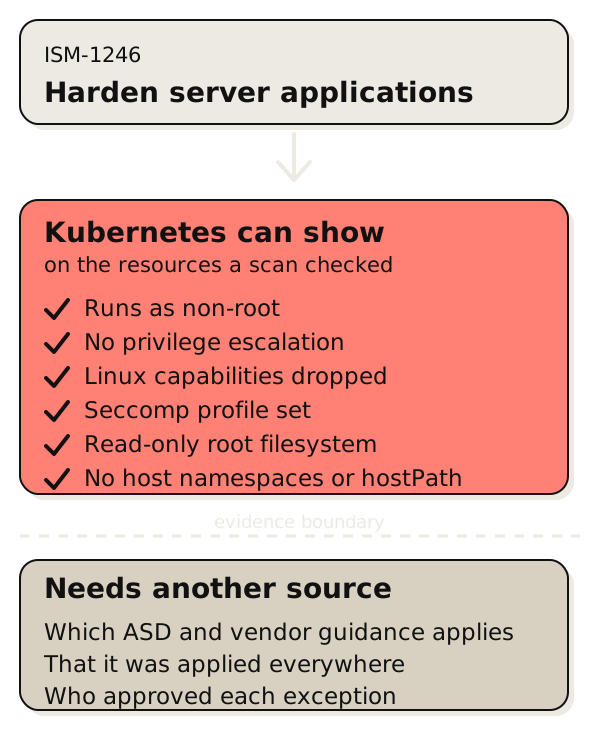
Kubernetes can show six of the settings involved: non-root execution, no privilege escalation, dropped Linux capabilities (the fine-grained root privileges a container can hold), a seccomp profile (a filter on which system calls a container may make), a read-only root filesystem, and no host namespaces (sharing the node’s network or process view) or hostPath volumes (mounting a directory from the node).
A clean result means those settings are right on the resources you checked. It doesn’t tell you whether your organisation found all the relevant ASD and vendor guidance, reconciled it and applied it everywhere.
Network controls work the same way. A detector can confirm that a workload has ingress and egress NetworkPolicy coverage. It can’t confirm that the allowed flows match a business need, or that your cluster’s network plugin enforces the policy. Write that limit next to the finding so nobody reads one passing check as more than it is.
What the repository contains
As of release v0.3.4 (October 2026), the repository maps 23 ISM controls to 30 Kyverno and Kubescape checks. For each mapping it records the claim being made and the evidence boundary.
- Canonical mapping: one YAML file connecting each control to its checks, the upstream source and a plain-language evidence note.
- Kyverno policies: 17 ClusterPolicy objects (Kyverno’s cluster-wide policy resource) covering 20 of the 23 controls.
- Kubescape view: 13 checks mapped to 10 controls, generated from the same file. The ISM framework I contributed to Kubescape’s regolibrary is built from that mapping, so
kubescape scan framework ismruns the scans. - Validation: CI checks the schema, checks the generated files for drift and runs the policy test fixtures. A provenance lock pins the release of ASD’s OSCAL catalogue (the machine-readable ISM) and the upstream Kubescape sources. Each tagged release publishes a checksum.
The controls span application control, patching, privileged access, backups, workload hardening and network restrictions. Sixteen of the 23 appear in ASD’s profile for Essential Eight Maturity Level Two, which lists 87 controls. (The Essential Eight is ASD’s baseline of eight mitigation strategies, and Level Two is the middle of three maturity levels. In October 2026 ASD announced ASD Essentials, a principles-based framework that will replace it, and hasn’t yet set a transition timeline. Existing Essential Eight evidence stays useful as a starting point.) The other seven are workload, credential and network controls from the full ISM. Three controls have only Kubescape checks: ISM-1182 and ISM-1416 (network) and ISM-2128 (kernel-mode code). The Kyverno steps below can’t produce evidence for those three.
Run the same policies in three places
Kyverno answers one question: did this resource meet policy when it was created or checked? Kubernetes calls the creation moment admission, when the API server accepts or rejects a new resource. Kubescape answers another: do the manifests or live resources meet the check right now? With a CI check added, you get evidence at three points. The next two sections cover the first two, CI and admission. The third, a Kubescape scan, has its own post.
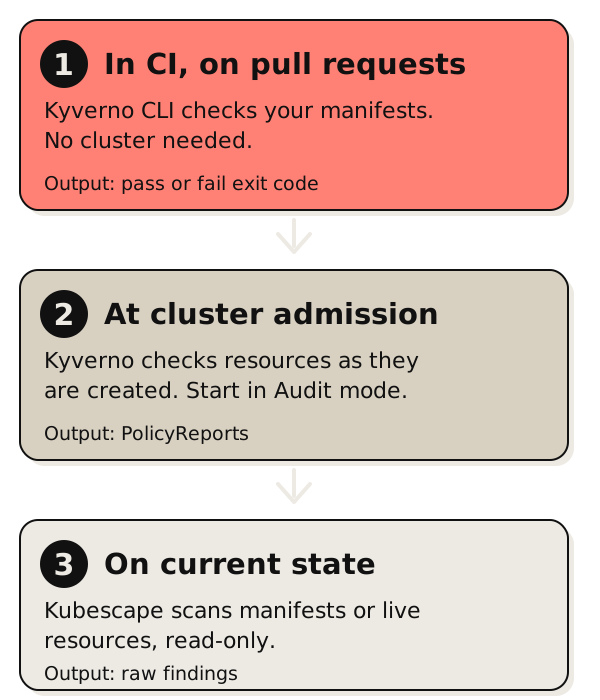
Keep each tool’s scope attached to its results when you combine them. Overlapping findings can appear under different policy names.
Check a manifest in five minutes, no cluster needed
The policy files that run inside a cluster also run against manifests on disk, so you can fail a pull request that adds an unhardened workload. You need the Kyverno CLI and a copy of the repository. I tested these commands with CLI v1.19.2.
brew install kyverno

git clone https://github.com/Latticework-Systems/ism-kubernetes-controls.git

cat > ns-values.yaml <<'EOF'
apiVersion: cli.kyverno.io/v1alpha1
kind: Values
namespaceSelector:
  - name: production
    labels:
      ism.latticework.systems/environment: production
EOF

kyverno apply ism-kubernetes-controls/policies/workload-hardening/policy.yaml \
  --resource k8s/ \
  --values-file ns-values.yaml
Several rules only apply to namespaces labelled ism.latticework.systems/environment=production. A CI job has no cluster to read labels from, so the values file tells the CLI which namespace carries which labels. Change production to your namespace name.
On a Deployment with no security settings, the CLI prints each failed rule and exits with code 1, which fails the CI job:
policy ism-workload-hardening-security-context -> resource production/Deployment/web failed:
1 - autogen-require-run-as-non-root validation error: Containers must run as non-root. ...
2 - autogen-require-no-privilege-escalation validation error: Containers must set allowPrivilegeEscalation: false. ...
...
pass: 1, fail: 5, warn: 0, error: 0, skip: 0
The fix is usually one block. Add this to the Deployment’s pod template and the same check passes (6 passed, 0 failed in my test):
spec:
  template:
    spec:
      securityContext:
        runAsNonRoot: true
        seccompProfile:
          type: RuntimeDefault
      containers:
        - name: web
          securityContext:
            allowPrivilegeEscalation: false
            readOnlyRootFilesystem: true
            capabilities:
              drop: ["ALL"]
Test before you roll this out. A read-only root filesystem breaks apps that write to disk, so mount an emptyDir volume for any path that needs to be writable. runAsNonRoot also needs an image whose default user isn’t root.
I’ve only run the workload-hardening family this way. Policies that read a ConfigMap, like the approved-registry allow-list, need that ConfigMap’s contents, and the CLI has no cluster to read it from. I haven’t tried supplying it by hand.
Then run Kyverno in the cluster, in Audit mode
The root bundle covers application control, workload hardening and privileged access. It runs in Audit mode, so your first review produces findings and blocks nothing.
Install Kyverno through your normal Helm or GitOps process. Then deploy the policies the same way, from a tagged release so every change to your evidence is a reviewed commit.
With Flux (a GitOps tool that keeps your cluster in sync with a Git repository), point a GitRepository at the release tag and a Kustomization at the repository root:
apiVersion: source.toolkit.fluxcd.io/v1
kind: GitRepository
metadata:
  name: ism-kubernetes-controls
  namespace: flux-system
spec:
  interval: 1h
  url: https://github.com/Latticework-Systems/ism-kubernetes-controls
  ref:
    tag: v0.3.4
---
apiVersion: kustomize.toolkit.fluxcd.io/v1
kind: Kustomization
metadata:
  name: ism-kubernetes-controls
  namespace: flux-system
spec:
  interval: 1h
  sourceRef:
    kind: GitRepository
    name: ism-kubernetes-controls
  path: ./
  prune: true
  # dependsOn: your Kyverno Kustomization, so Kyverno's policy types exist first
Two files stay in your own config repo, because they describe your environment: the approved-registry ConfigMap and the namespace labels. Start from docs/templates/approved-registries-configmap.yaml and docs/templates/namespace-labels.yaml, and commit your edited copies alongside the Flux objects above. To try the bundle on a test cluster first, apply the same files by hand:
git clone https://github.com/Latticework-Systems/ism-kubernetes-controls.git
cd ism-kubernetes-controls

# Edit these files before applying them:
# docs/templates/approved-registries-configmap.yaml
# docs/templates/namespace-labels.yaml

kubectl apply -f docs/templates/approved-registries-configmap.yaml
kubectl apply -f docs/templates/namespace-labels.yaml
kubectl apply -k .
Then read the raw findings:
kubectl get policyreport,clusterpolicyreport -AKyverno writes one report per scanned resource. The output looks like this (names and counts are illustrative):
NAMESPACE    NAME                                                  KIND         NAME            PASS   FAIL   WARN   ERROR   SKIP   AGE
payments     policyreport.wgpolicyk8s.io/0b7e41c2-5d1a-4f63-9a0e   Deployment   checkout-api    14     3      0      0       0      6m
payments     policyreport.wgpolicyk8s.io/6c92d8f0-1e47-4b2a-8c35   Deployment   ledger          17     0      0      0       0      6m
monitoring   policyreport.wgpolicyk8s.io/a41f09bd-73c6-4e18-b2d7   DaemonSet    node-exporter   9      8      0      0       0      6m

NAME                                                    KIND        NAME         PASS   FAIL   WARN   ERROR   SKIP   AGE
clusterpolicyreport.wgpolicyk8s.io/f3d58a16-92b0-4c7e   Namespace   payments     3      0      0      0       0      6m
clusterpolicyreport.wgpolicyk8s.io/2e60b7a9-c814-45d3   Namespace   monitoring   2      1      0      0       0      6m
A non-zero FAIL is a finding to review, not a verdict. In this example node-exporter fails several workload hardening checks, which is common for node agents that need host access. Use kubectl describe on a report to see which policy and rule failed.
Stay in Audit for the first pass. You’ll find which workloads and platform namespaces are affected, and you can review the assumptions behind each policy. Move a policy to Enforce once the owning teams agree on its scope and how exceptions get approved.
Read a finding without overstating it
For each finding:
- Identify the object and the detector. Record the resource, the rule and the result.
- Open the mapped ISM control. Confirm the relationship in
mapping/ism-mapping.yaml. - Read the
evidence_note. Carry its limitation into your report. - Record the collection context. Note the cluster or manifest scope, the time, the tool version and the mapping version.
- Ask for the missing evidence. Send governance, identity, backup and process questions to the system or person who can answer them.
Another engineer or assessor can then challenge the finding and reproduce it. Whether the control is met is still the assessor’s call.
Evidence you need from outside Kubernetes
Kubernetes can’t show you organisation-wide ISM compliance or certification, governance and risk acceptance, identity provider and endpoint configuration, scanner cadence, backup completion or successful restores, or whether a declared network rule matches business intent. Put these gaps next to each result so readers can see what the tool observed and what’s still unknown. If you’re preparing for an IRAP assessment, our IRAP readiness work covers collecting and handing over that wider evidence.
Try it, and challenge it
The repository is Apache-2.0 licensed. Platform engineers can run the CI check or the Audit bundle. If you’re a security engineer or assessor, challenge the control mappings, the test fixtures and the evidence notes. A star on the repository helps other teams find it.
FAQ
What does Australian ISM Kubernetes compliance mean?
It means picking the ISM requirements Kubernetes can show evidence for, running checks against your cluster or manifests, and feeding the results into your wider risk and assessment process. Kubernetes checks back up some control claims. They can’t establish compliance for the whole organisation.
Can Kyverno prove ISM compliance?
No. Kyverno produces evidence about Kubernetes resource configuration at admission, in policy reports and in CI. It can’t prove the governance, operational or non-Kubernetes parts of an ISM control. Treat each result as one piece of evidence: write down what it covered, when you collected it and what it can’t show.
Which ISM controls does the repository cover?
As of v0.3.4, the mapping has 23 detector-backed ISM controls across application control, patching, privileged access, backups, workload hardening and network restrictions. Kyverno policies cover 20 of them. The other three (ISM-1182, ISM-1416 and ISM-2128) use Kubescape checks.
Should I use Kyverno or Kubescape for ISM evidence?
Use Kyverno for CI, admission-time and background policy evidence. Use Kubescape for read-only scans of manifests or current cluster state. Many teams use both, since they observe different points in a resource’s life.