Want to know which of your Kubernetes workloads would trip an Australian ISM check, before an assessor finds out? One Kubescape command scans a folder of manifests (the YAML files that describe your workloads) and tells you. It also covers three ISM controls (ISM-1182, ISM-1416 and ISM-2128) that the Kyverno policies in our other ISM repository have no check for.
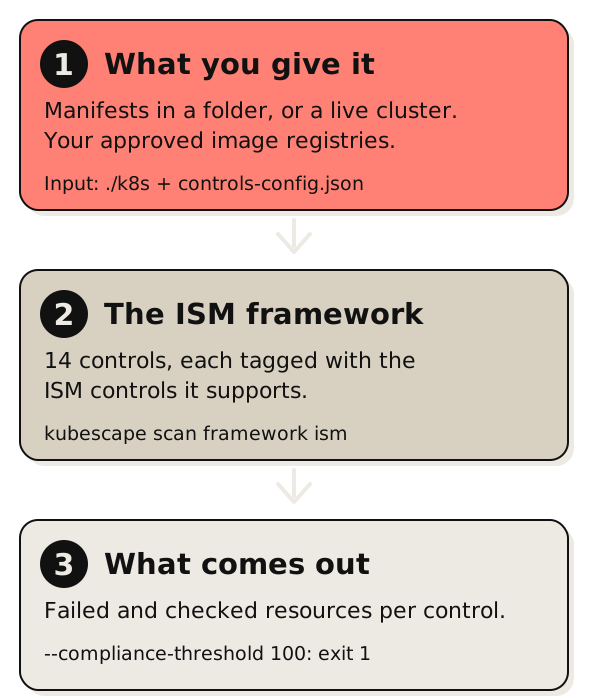
Kubescape is an open-source scanner. It reads manifests or a running cluster and reports which resources fail a check. A set of checks is called a framework, and Kubescape now ships one for the Information Security Manual (ISM), the Australian Signals Directorate’s cyber security framework. I contributed it to Kubescape’s regolibrary, so there is nothing to build or clone.
Scan Kubernetes manifests against the ISM
You need the Kubescape CLI. I used Kubescape 4.0.16 in October 2026. Here is a Deployment that sets nothing beyond a name and an image. Save it as k8s/web.yaml:
apiVersion: apps/v1
kind: Deployment
metadata:
  name: web
  namespace: production
spec:
  replicas: 2
  selector:
    matchLabels: {app: web}
  template:
    metadata:
      labels: {app: web}
    spec:
      containers:
        - name: web
          image: ghcr.io/example/web:1.4.2
One check needs your input first. The approved-registry check compares each image against an allow list, and a manifest can’t supply that list for itself. Without one, Kubescape reports the check as “Action Required” instead of passing or failing it. Kubescape documents these inputs under configuring controls. Start from the defaults in regolibrary, so the other checks keep their settings, and add your registry:
# Download Kubescape's default settings for every control
curl -sLO https://raw.githubusercontent.com/kubescape/regolibrary/master/default-config-inputs.json

# Keep the settings Kubescape reads, and set the registries you approve
jq '.settings.postureControlInputs | .imageRepositoryAllowList = ["ghcr.io/example/"]' \
  default-config-inputs.json > controls-config.json

# Scan the manifests in ./k8s against the ISM framework
kubescape scan framework ism ./k8s \
  --controls-config controls-config.json \
  --compliance-threshold 100   # exit with code 1 if any check fails
The result:
Controls: 14   Passed: 9   Failed: 5

 Severity  Control name                   Failed resources  Compliance score
 Medium    Non-root containers            1 of 1            0%
 Medium    Allow privilege escalation     1 of 1            0%
 Medium    Ingress and Egress blocked     1 of 1            0%
 Medium    Seccomp profile                1 of 1            0%
 Low       Immutable container filesystem 1 of 1            0%
(I trimmed the table borders, shortened the control names, dropped the ISM IDs that Kubescape appends to each name, and merged the two resource-count columns into “1 of 1”.) --compliance-threshold 100 makes the command exit with code 1 if any check fails, so the same line fails a CI job.
Fix it and scan again
Add the security settings to the pod template, plus a NetworkPolicy, which is a Kubernetes rule that limits which pods can talk to each other:
# In the Deployment's pod template:
spec:
  securityContext:
    runAsNonRoot: true
    seccompProfile:
      type: RuntimeDefault
  containers:
    - name: web
      securityContext:
        runAsNonRoot: true
        runAsUser: 10001
        runAsGroup: 10001
        allowPrivilegeEscalation: false
        readOnlyRootFilesystem: true
        capabilities:
          drop: ["ALL"]
---
apiVersion: networking.k8s.io/v1
kind: NetworkPolicy
metadata:
  name: web
  namespace: production
spec:
  podSelector:
    matchLabels: {app: web}
  policyTypes: [Ingress, Egress]
  ingress:
    - from:
        - podSelector:
            matchLabels: {app: gateway}
  egress:
    - to:
        - podSelector:
            matchLabels: {app: db}
Scan again and all 14 controls pass, with exit code 0. The non-root check wants runAsNonRoot, runAsUser and runAsGroup set on the container. My first fix set only runAsNonRoot, and the check still failed. Test before you copy this into production. A read-only root filesystem breaks apps that write to disk, and the egress rule above only allows traffic to a db pod, so DNS lookups would fail until you allow them too.
A pass can mean nothing was checked
Look at two rows from the fixed scan:
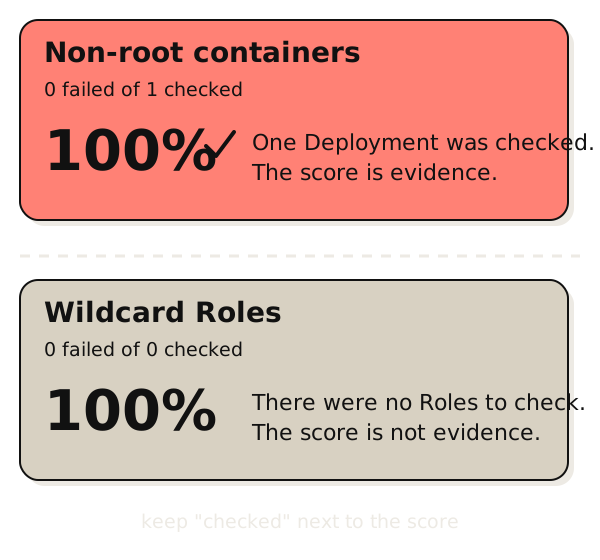
 High    Minimize wildcard use in Roles and ClusterRoles   0 of 0   100%
 Medium  Default service accounts are not actively used    0 of 0   100%
Those two show 100% because there was nothing for them to check. A folder holding one Deployment and one NetworkPolicy has no Roles. Kubescape also skips the cluster-admin check on manifest scans, because that check only runs against a live cluster. A 100% score on zero resources is a gap. When you collect this as evidence, keep the “resources checked” column next to the score.
Which ISM controls the checks support
Each Kubescape control is tagged with the ISM controls it produces evidence for. These are the mappings I’d point an assessor at first:
| Check | ISM controls |
|---|---|
| Ingress and Egress blocked (network policy) | ISM-1182, ISM-1416 |
| Privileged container | ISM-1246, ISM-1490, ISM-1604, ISM-1657, ISM-1871, ISM-2128 |
| Insecure capabilities | ISM-1246, ISM-1604, ISM-2128 |
| Non-root, privilege escalation, read-only filesystem, seccomp profile, host namespaces, hostPath, hostPort | ISM-1246, ISM-1604 |
| Images from allowed registry | ISM-1490, ISM-1657, ISM-1871 |
| Cluster-admin role, wildcard permissions | ISM-1883 |
| Default service accounts not used | ISM-2143 |
A pass is technical evidence, not compliance. Each control’s description quotes the ISM statement and says what a result leaves open. The network policy check shows that a policy selects the workload and declares ingress or egress. It doesn’t read what the policy allows, so an allow-all policy passes, and I confirmed that an ingress-only allow-all policy passes it. It also doesn’t show that your cluster’s network plugin enforces NetworkPolicy at all. ISM-1182 asks for traffic to be limited “to only that required for business purposes.” That judgement stays with a person.
Scan a live cluster
Leave out the folder and Kubescape scans a live cluster. Pass --kube-context to be sure which one:
kubescape scan framework ism --kube-context your-clusterI ran this read-only against my homelab. A few rows from the result:
Controls: 15   Failed: 14   Action Required: 1

 Severity  Control name                Failed resources  All resources  Compliance score
 High      Privileged container        19                160            88%
 High      Cluster-admin role          6                 103            94%
 Medium    Non-root containers         93                160            42%
 Medium    Ingress and Egress blocked  18                232            92%

Resources with a failure: 194 of 479   Compliance score: 69.68%
(I picked four rows and shortened the control names.) The cluster-admin check only runs on a live scan, so it didn’t appear in the manifest scan above. The registry check showed “Action Required” because I didn’t pass an allow list.
That 70% isn’t a grade. Kubescape’s score is a weighted pass rate, and the ISM sets no threshold for it. What matters is which failures you can explain. Some workloads, such as storage and networking components, legitimately need elevated access, and the rest need hardening. The scan finds them. It doesn’t decide which ones matter.
Kyverno or Kubescape
Kyverno checks a resource as it’s created. Kubescape checks the manifests or the cluster as they stand when you run it. Most teams will want both: Kyverno to stop new problems, Kubescape for the three controls above and for a look at what’s already running. Our Kyverno post covers the first half, starting with a CI check that needs no cluster.
FAQ
How do I scan Kubernetes manifests against the Australian ISM?
Install the Kubescape CLI and run kubescape scan framework ism ./k8s, where ./k8s is a folder of manifests. Pass a --controls-config file with your approved image registries, or the registry check reports “Action Required”. Add --compliance-threshold 100 to fail a CI job when any check fails.
What does a 100% Kubescape score mean?
It means no resource failed the check. It doesn’t mean the check saw anything. A control with 0 failed of 0 checked also scores 100%, because there was nothing to evaluate. Keep the resources-checked column beside the score when you hand results to an assessor.
Does Kubescape have a built-in ISM framework?
Yes. The ISM framework is part of Kubescape’s regolibrary, and I used it with Kubescape 4.0.16. Run kubescape list frameworks to see it, and kubescape scan framework ism to use it.
Which ISM controls can this Kubescape framework support?
At the version I tested, partial evidence for ISM-1182, ISM-1246, ISM-1416, ISM-1490, ISM-1604, ISM-1657, ISM-1871, ISM-1883, ISM-2128 and ISM-2143. Governance, identity, backup and endpoint evidence comes from other sources.
Can I run the scan in CI?
Yes. Add --compliance-threshold 100 and the command exits with code 1 when any check fails, so a pull request that adds an unhardened workload fails the build.